|
Flashlink to PC
October 9 2001 at 7:09 PM | Pbox
|
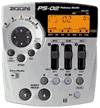
| I am a recent buyer of the PS-o2. I purchased a Simpletech USB flashlink to transfer my audio files from the smartmedia card to my PC. They show up in MS Explorer as having .aud extentions but they will not associate/convert to audio .wav or.mpg files or play directly in Winamp or Realplayer. Is it as simple as downloading the card manager program and converting the files or is flashlink not the proper way to transfer? Thoughts?
Thanks
|
|
| Author | Reply |
Shamus
| | Convert or Record | October 9 2001, 7:41 PM |
You have two options.
Download Card Manager from www.zoom.co.jp/english which will convert the aud files into wav files. There is an AUD file for each track so if you've recorded more than one in any given song you'll have to match them up again in some multi-track software. N-track is shareware and dowloadable at www.fasoft.com, but you could also try Pro Tools Free, or a Cakewalk product.
The second option is to take a lead from the headphone output and pop the other end into the line-in on your soundcard. Then just record the output with Sound Recorder, Musicmatch (free), N-track, Goldwave, Soundforge .... you get the idea. The advantage of this way is you don't have to realign the individual tracks and you get any drum and bass patterns you have programmed. The first method will allow much more post-production tinkering.
Fave fun.
|
|
Rob
| | Shamus - One more Q | October 11 2001, 2:35 PM |
Thanks for the help, it worked just fine. When transferring each track to NTRACK, is it possible to transfer the drums so I can mix the entire song on NTRACK or do I send back the mixed guitar tracks to the PS-02, and they resynch with the drum pattern - then send out via 1/4" to 1/8" soundcard as one .wav file? Should I delete the old guitar tracks on the smartcard and replace with the NTRACK remixed tracks or do they automatically override them when transferring back?
|
|
Shamus
| | Untitled | October 11 2001, 8:56 PM |
You should be able to convert the drum and bass 'track' to MIDI using card manager. Once you have the SMF file then you can import that into the software app.
If you need to compound tracks then you could use the bounce feature before importing tracks on the computer. Once you get into editing the song on the computer I would complete it there too. However if you want to record back onto the PS-02 the best thing to do would be to erase any unnecessary tracks before recording them. Make sure you erase any multiple takes. Don't just erase the song as that will remove the drum track too. I guess this could be useful when editing on the computer and want to record additional tracks on the PS-02 and then add them to the mix on the PC.
|
|
|
Advertisement:
 Rent DVDs online -- Free Trial for 2 weeks!
|
|